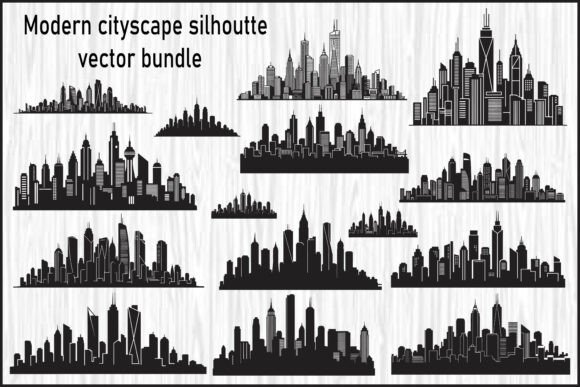
Modern Cityscape Silhouette Vector: A Practical Guide for Design Workflows
In the fast-paced world of visual communication, the ability to access high-quality assets that integrate seamlessly into a project is a significant competitive advantage. The Modern Cityscape Silhouette Vector bundle represents more than just a collection of images; it is a foundational toolkit for professionals and creators who need to establish an urban aesthetic quickly and effectively. Whether you are designing a logo for a tech startup, creating wall art for a modern office, or preparing marketing materials for a real estate firm, these stylized skylines offer a clean, elegant starting point that saves hours of manual drafting.
This resource is specifically engineered to fit into various stages of the creative process, from initial concepting to final production. By understanding how to leverage the different file formats included—EPS, JPG, SVG, and PNG—you can streamline your workflow, ensure compatibility across diverse platforms, and maintain consistent quality control throughout your projects.
Integrating Urban Aesthetics into Your Creative Process
The decision to use a cityscape silhouette often occurs early in the design phase when establishing the mood and identity of a brand or product. A modern skyline conveys progress, density, sophistication, and connectivity. However, drawing these complex structures from scratch is time-consuming and requires a high level of technical skill. This is where the Modern Cityscape Silhouette Vector bundle becomes a critical asset. It allows designers to bypass the tedious vectorization process and focus on composition, color theory, and layout strategy.
Before diving into specific software, consider the end goal of your project. Are you creating a digital asset for social media, a print-ready poster, or a physical decal for a storefront? The versatility of this bundle lies in its ability to adapt to these distinct outcomes without compromising resolution or clarity. By having a library of 15 unique silhouettes, you can experiment with different urban profiles to find the one that best aligns with your client's vision or your personal artistic direction.
Mastering File Formats for Specific Workflows
One of the most common pitfalls in graphic design is using the wrong file format for a specific application. This bundle addresses that challenge by providing four distinct formats, each tailored to a specific stage of production. Understanding the nuances of EPS, SVG, PNG, and JPG files ensures that your workflow remains efficient and your output remains professional.
EPS Files: The Foundation for Professional Branding
For designers working within Adobe Illustrator or CorelDRAW, the EPS (Encapsulated PostScript) files are the cornerstone of the bundle. These fully editable vector files allow for granular control over every node, path, and shape. When working on large-scale branding projects, such as billboards, building signage, or corporate stationery, scalability is non-negotiable. EPS files maintain sharp edges at any size, ensuring that your design does not pixelate when blown up to massive dimensions.
In a practical workflow, you would import the EPS file into your vector editor during the initial design phase. From there, you can modify the skyline to match specific architectural requirements, add custom typography, or adjust the decorative elements to fit a brand's color palette. Because these files are fully editable, they serve as a robust template for iterative design, allowing you to refine the concept until it meets strict client specifications.
SVG Files: Efficiency for Digital and Cutting Machines
The SVG (Scalable Vector Graphics) format bridges the gap between traditional desktop publishing and modern fabrication. If your workflow involves creating logos for web applications, decals for vehicles, or vinyl cuts for merchandise, SVG is the industry standard. Unlike raster images, SVGs are resolution-independent, meaning they look crisp on a smartphone screen or a giant billboard.
Crucially, these files are compatible with cutting machines like Cricut and Silhouette. For entrepreneurs running small businesses that produce custom stickers, t-shirts, or home decor, the SVG files eliminate the need for manual tracing. You can import the skyline directly into your machine's software, adjust the colors if necessary, and send it straight to the cutter. This integration significantly reduces production time and minimizes errors associated with manual digitizing.
PNG Files: Versatility for Web and Mockups
When speed and ease of overlay are priorities, the PNG (Portable Network Graphics) files become invaluable. These high-resolution images come with transparent backgrounds, making them ideal for quick compositing in tools like Photoshop, Canva, or Figma. In a marketing workflow, you might need to place a cityscape behind text for a social media post or overlay it onto a product mockup to visualize how a design looks in context.
The transparency feature allows for seamless blending with other design elements. For instance, if you are creating a presentation deck for a real estate development, you can drop a PNG skyline into your slide background and instantly create a professional, urban atmosphere. Similarly, for digital products like e-book covers or website headers, these files provide the necessary visual weight without the complexity of vector editing.
JPG Files: Quick Previews and Presentations
While vectors and transparent PNGs are essential for production, JPG (Joint Photographic Experts Group) files serve a vital role in the planning and review stages. These high-quality raster images on a white background are perfect for creating previews, sharing concepts with clients, or including in proposals where editing capabilities are not required.
In a collaborative environment, sending a heavy EPS file to a non-designer client can be confusing. Instead, you can export a JPG version to show the overall composition and style. This facilitates faster feedback loops and helps stakeholders visualize the final outcome without getting bogged down in technical details. Once the concept is approved, you can switch back to the vector formats for the actual execution.
Strategic Implementation Tips for Maximum Impact
To get the most out of the Modern Cityscape Silhouette Vector bundle, organization and preparation are key. Before starting a project, take time to organize the files into a logical folder structure based on format and intended use. This simple step prevents version control issues and ensures you always have the correct file type ready when needed.
Consistency is another factor to consider. If you are creating a series of posters or a set of branded materials, select a single skyline silhouette and apply it across all touchpoints. This creates a cohesive visual identity that reinforces brand recognition. You can further unify the design by applying the same color grading, texture overlays, or typographic treatments to each piece.
Furthermore, consider the interaction between the cityscape and other design elements. A busy skyline can compete with detailed photography or intricate typography. In such cases, simplify the composition by using the silhouette as a subtle background element, perhaps with reduced opacity or a monochromatic color scheme. Conversely, if the skyline is the hero of the design, keep surrounding elements minimal to let the urban profile stand out.
Long-Term Value and Workflow Optimization
Investing in a comprehensive vector bundle like this offers long-term value beyond a single project. As your business grows or your portfolio expands, having a reliable library of high-quality assets means you can respond to new opportunities faster. Whether you are a freelancer juggling multiple deadlines or a marketing team launching a campaign, the ability to pull a professional-grade cityscape from your archive can be the difference between meeting a deadline and missing it.
Moreover, these assets encourage experimentation. Because the files are editable and scalable, you can repurpose them for different seasons, events, or themes. A skyline designed for a summer festival can be tweaked with different colors and lighting effects for a winter holiday promotion. This flexibility extends the lifespan of the asset and maximizes your return on investment.
Ultimately, the Modern Cityscape Silhouette Vector bundle is a tool for empowerment. It removes technical barriers, allowing creators to focus on what they do best: telling stories through design. By integrating these files into your workflow with intention and strategic planning, you can produce work that is not only visually stunning but also technically flawless and perfectly aligned with your goals.